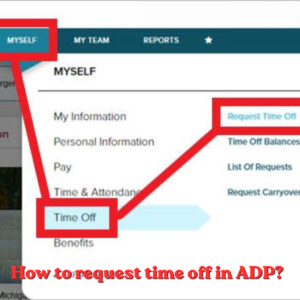
How to request time off in ADP
How to request time off in ADP? How to Request Time Off in ADP (Web & Mobile Guide) 2026 | ADP Salary Calculator Payroll &
Both platforms promise to simplify payroll — but they price it very differently. Here’s what ADP and QuickBooks Workforce actually cost, feature by feature, at real employee counts.
If you’ve searched “ADP vs. QuickBooks Payroll cost,” you’ve probably noticed the two companies don’t make this an apples-to-apples comparison. QuickBooks publishes its pricing tiers openly. ADP, outside of its entry-level ADP Run product, generally requires a custom quote — which makes real cost comparisons harder to find.
This guide breaks down what each platform actually costs in 2026, where the hidden fees hide, how the two compare on features that affect your day-to-day payroll work, and which one tends to make more financial sense at different company sizes.
If you’re estimating what an employee’s paycheck will look like once payroll is running, our free ADP Salary Calculator can help with the employee side of the equation.
ADP and QuickBooks Workforce (Intuit’s payroll product, previously branded QuickBooks Payroll) both automate paying employees, filing payroll taxes, and keeping you compliant with federal and state rules — but they come from very different starting points.
| ADP | QuickBooks Workforce | |
|---|---|---|
| Parent company | ADP, Inc. | Intuit Inc. |
| Core strength | Scalability, HR depth, compliance | Tight accounting integration, transparent pricing |
| Best fit | Growing or multi-state businesses with HR complexity | Small businesses already using QuickBooks accounting |
| Pricing model | Mostly custom quotes (except ADP Run) | Published tiered pricing |
| Standalone accounting product | No — payroll/HR focused | Yes — payroll is an add-on to QuickBooks accounting |
Because QuickBooks Workforce grew out of QuickBooks accounting software, it’s built to work best when you’re already using QuickBooks Online to run your books. ADP, by contrast, is a standalone payroll and HR platform that connects to your accounting software rather than living inside it.
One reason ADP pricing is confusing is that “ADP” isn’t one product — it’s a family of products aimed at different business sizes:
| ADP Product | Typical Business Size | Notes |
|---|---|---|
| ADP Run | Small business (1–49 employees) | Priced comparably to QuickBooks Workforce; closest entry-level competitor |
| ADP Workforce Now | Mid-sized business | Adds deeper HR, benefits administration, and reporting; custom pricing |
| ADP Workforce Now Next Generation | Mid-to-large business | Modernized version of Workforce Now with expanded self-service and analytics |
| ADP TotalSource | Businesses wanting a PEO relationship | Bundles payroll with HR outsourcing and co-employment benefits |
| ADP Comprehensive Services | Larger or resource-constrained teams | ADP staff handle payroll functions directly, not just software |
QuickBooks Workforce (formerly QuickBooks Payroll Core, Premium, and Elite) publishes its pricing directly, structured as a monthly base fee plus a per-employee fee:
| Plan | Approx. Base Fee | Approx. Per-Employee Fee | Adds |
|---|---|---|---|
| Workforce Payroll (entry) | ~$50/mo | ~$6.50/mo | Full-service payroll, tax filing, next-day deposit, employee portal |
| Workforce Premium | ~$85–$88/mo | ~$9–$10/mo | Same-day deposit, time tracking, expert setup review, HR support center |
| Workforce Elite | ~$125–$134/mo | ~$10–$11/mo | Tax penalty protection, personal HR advisor, white-glove setup |
QuickBooks Workforce can be purchased standalone (payroll only) or bundled with QuickBooks Online accounting plans (such as Simple Start, Essentials, or Plus). Bundles typically cost more in total but consolidate your accounting and payroll into one subscription and one login.
ADP doesn’t publish per-employee pricing for most of its products, which is a common criticism. Instead, an ADP quote is built from several inputs:
ADP Run, the small-business tier, is generally priced in a similar range to QuickBooks Workforce’s mid tiers once you account for per-employee costs — but because it isn’t published, the only reliable way to know your exact price is to request a quote.
The advertised base price rarely tells the whole story. Here’s where extra charges tend to show up:
| Fee Type | ADP | QuickBooks Workforce |
|---|---|---|
| Year-end tax form processing | Often a separate charge on some plans | Typically included |
| Same-day direct deposit | May require an upgraded service level | Premium/Elite tiers only |
| Multi-state tax filing | Usually included, but may raise the base quote | May incur added per-state fees on lower tiers |
| Setup / onboarding fee | Sometimes charged, sometimes waived by the rep | Usually included, especially with Premium/Elite guided setup |
| HR advisory support | Bundled into higher-tier products or add-ons | Included starting at Premium |
| Required companion subscription | Not applicable | Full integration benefits require an active QuickBooks Online subscription |
Using published QuickBooks Workforce rates and typical ADP Run market rates, here’s roughly what monthly payroll software costs look like at different employee counts. Treat these as ballpark estimates — get an exact quote for your situation.
*ADP figures are directional estimates based on typical small-business market pricing, not official published rates. QuickBooks Workforce operates as a hard employee limit per tier (25/50 for lower tiers), so growing past that limit forces a tier upgrade. Always request a current, exact quote from each provider before deciding.
ADP supports complex organizational structures, multiple pay rates per employee, bulk employee updates, and automated onboarding workflows — useful once you have several departments or locations. QuickBooks Workforce keeps this simpler: employee profiles, direct deposit setup, and basic benefits deductions, which is enough for most businesses under about 50 employees.
ADP files taxes automatically across federal, state, and local levels and generally guarantees accuracy, taking responsibility for penalties caused by its own errors. QuickBooks Workforce also automates tax filing in most states and, on the Elite tier, adds tax penalty protection — though coverage details and dollar limits differ from ADP’s guarantee, so it’s worth reading the specific terms of each.
QuickBooks Workforce includes QuickBooks Time (formerly TSheets) starting at the Premium tier, giving you built-in time tracking that flows directly into payroll. ADP doesn’t include time tracking natively in the same way but connects to time and attendance tools — including its own ADP Time & Attendance module — for similar functionality.
ADP’s reporting leans toward workforce analytics: labor cost trends, compliance metrics, and custom reports across departments. QuickBooks Workforce’s reporting is tightly linked to your accounting data, which is convenient for cash flow and budget planning but less specialized for HR-style analytics.
Both platforms offer benefits administration through partners rather than fully in-house: ADP through its Marketplace ecosystem, and QuickBooks Workforce through integrated partners like Allstate (health) and Vestwell (401(k)).
| ADP | QuickBooks Workforce | |
|---|---|---|
| Support hours | 24/7 phone support commonly cited for larger plans | Business-hours phone/chat on entry tier; weekend support added on Premium/Elite |
| Dedicated account rep | Common on mid-size and larger accounts | Not standard; higher tiers get more personalized setup help |
| Setup assistance | Structured onboarding process, especially on larger products | Guided Setup session on Premium/Elite; self-serve on entry tier |
| User-reported ease of use | More powerful but often described as having a steeper learning curve | Generally rated intuitive, especially for existing QuickBooks users |
In practice, support quality on both platforms can vary by plan tier and by the specific representative or account team assigned — it’s worth asking pointed questions about response times during the sales process rather than relying on general reputation alone.
Payroll data is sensitive — it includes Social Security numbers, bank account details, and compensation history — so security posture matters as much as price.
Moving from one payroll provider to the other is common and both companies support it, but timing and preparation matter:
You already use QuickBooks Online for accounting, have a small and relatively simple team, and want predictable, published pricing.
You’re growing quickly, operate in multiple states, need deeper HR and benefits tools, or expect payroll complexity to increase over the next year or two.
Neither platform is universally “cheaper” — the right answer depends on your headcount, growth trajectory, and how much you value having payroll and accounting in a single connected system versus a dedicated payroll and HR platform with room to grow into.
ADP Run, the small-business tier, is generally priced comparably to QuickBooks Workforce for similar-sized teams. ADP’s larger products cost more because they include substantially more HR and compliance functionality — not because ADP is inherently pricier for the same feature set.
Advertised prices often reflect a limited-time promotional discount, commonly 50% off for the first three months. Budget using the standard, non-promotional monthly rate to avoid a budget surprise later.
QuickBooks Workforce can be purchased as a standalone payroll product without a full QuickBooks Online accounting subscription, though the deepest integration benefits (automatic ledger sync) only apply if you’re using both together.
Mid-year switches happen regularly and both providers support them with migration assistance. The main risk is around quarter-end tax filings, which is why many businesses time the switch to a quarter boundary rather than avoiding it altogether.
Whichever payroll provider you choose, see exactly how gross pay turns into net pay with our free ADP Salary Calculator.
Try the Free Calculator →How to request time off in ADP? How to Request Time Off in ADP (Web & Mobile Guide) 2026 | ADP Salary Calculator Payroll &

What Is FICA Tax and Why Is It Taken From My Paycheck? What Is FICA Tax and Why Is It Taken From My Paycheck? (2026)

How to calculate overtime pay for taxes (With Examples) How to Calculate Overtime Pay for Taxes (With Examples) 2026 | ADP Salary Calculator Payroll Tax
ADP Direct Deposit: How to Set It Up and How Long It Takes ADP Direct Deposit: How to Set It Up and How Long It

How to Calculate Federal Unemployment Tax? How to Calculate Federal Unemployment Tax (FUTA) 2026 | ADP Salary Calculator Employer Payroll Guide · Updated June 2026

What Does “YTD” Mean on a Paycheck? What Does “YTD” Mean on a Paycheck? | ADP Salary Calculator Paycheck Basics · Updated June 2026 What
Estimate your net pay with this easy-to-use salary paycheck calculator.
Copyright © 2026. All Rights Reserved.