ADP Direct Deposit: How to Set It Up and How Long It Takes
ADP Direct Deposit: How to Set It Up and How Long It Takes (2026) | ADP Salary Calculator
ADP Payroll Guide · Updated June 2026
ADP Direct Deposit: How to Set It UpAnd Exactly How Long It Takes
Everything you need to know about ADP direct deposit — setup steps for employees and employers, timing, split deposits, and what to do when something goes wrong.
📅 June 2026⏱ 8 min read🌐 adpsalarycalculator.com
⚡ Quick Answers
How long to set up?
1–2 pay cycles (2–4 weeks)
When does deposit hit?
By 12:01 AM on pay day
Max accounts allowed?
Up to 4 bank accounts
Where to set up (employee)?
my.adp.com → Pay → Direct Deposit
Direct deposit is the fastest, safest, and most convenient way to receive your paycheck. Instead of waiting for a paper check — and then waiting again for it to clear at the bank — direct deposit puts your pay directly into your bank account on payday, often by midnight.
ADP, which processes payroll for over 1 million businesses across the US, makes setting up direct deposit straightforward for both employees and employers. Whether you’re a new hire trying to enroll, or an HR manager setting up direct deposit for your team, this guide walks you through every step.
ADP direct deposit is an electronic payment method that transfers your paycheck directly from your employer’s bank account into your personal bank account through the ACH (Automated Clearing House) network — the same system used for most electronic payments in the US.
Instead of receiving a physical check that you have to deposit and wait for, your money appears in your bank account automatically on each pay date — often before you even wake up on payday morning.
How the ADP Direct Deposit Process Works
Employee provides banking detailsYou give your employer your bank routing and account numbers via ADP’s self-service portal or a paper form.
Employer processes payroll through ADPOn payroll processing day (usually 2–3 days before pay date), your employer submits payroll to ADP.
ADP sends payment instructions to the ACH networkADP transmits your payment information to the Automated Clearing House network for processing.
ACH routes funds to your bankYour bank (the Receiving Depository Financial Institution) receives the transfer and posts it to your account.
Funds available on pay dateYou can access your money — usually by 12:01 AM on your scheduled pay date, sometimes even earlier with early direct deposit.
Important
ADP direct deposit is free for employees. Some employers may charge a small fee for paper checks — another reason to switch to direct deposit.
2 Employee Setup
How to Set Up ADP Direct Deposit Online (my.adp.com)
Most employees can set up or update direct deposit themselves through ADP’s employee self-service portal at my.adp.com — no paperwork or HR visit required.
What You’ll Need Before You Start
Your ADP employee login credentials (from your employer)
Your bank’s 9-digit ABA routing number (bottom-left of a paper check)
Your bank account number (bottom-center of a paper check)
Account type: checking or savings
Step-by-Step: Setting Up Direct Deposit on my.adp.com
Log in to my.adp.comGo to my.adp.com and sign in with your employee username and password. First time? Use the registration link on the login page and enter your registration code from your employer.
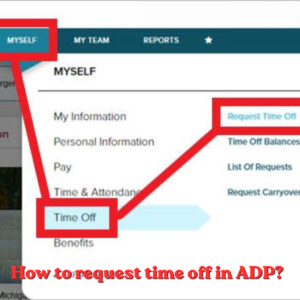
Navigate to Pay → Direct DepositFrom your dashboard, click “Pay” in the top navigation menu, then select “Direct Deposit” or “Payment Options” from the dropdown.
Click “Add Account” or “Set Up Direct Deposit”If this is your first time, you’ll see an option to add your bank details. If you already have one account and want to add more, click “Add Another Account.”
Enter your bank routing and account numberType in your 9-digit routing number and full account number carefully. Double-check against a physical check or your bank’s online portal — a single digit error will cause your deposit to fail.
Choose account type and deposit amountSelect “Checking” or “Savings.” If you have one account, select “Entire Net Amount” or “100%.” For multiple accounts, set a dollar amount or percentage (see the split deposit section below).
Review and confirmDouble-check all details, then click Save or Submit. ADP will typically send a zero-dollar prenote to verify the account before your first real deposit goes through.
💡 Can’t Find the Option? Some employers restrict employee self-service for direct deposit changes. If you don’t see a “Direct Deposit” option in your ADP portal, contact your HR or payroll department — they’ll need to make the update for you.
3 Paper Form
How to Set Up ADP Direct Deposit via Paper Form
If your employer doesn’t use the ADP self-service portal — or if you prefer paper — you can also submit a direct deposit authorization form to HR.
Information Required on the Form
Your full legal name
Your employee ID or last 4 digits of SSN
Bank name
9-digit ABA routing number
Full bank account number
Account type (checking or savings)
Deposit amount (full net pay, specific dollar amount, or percentage)
Your signature and date
💡 Void Check Tip: Many employers ask for a voided check along with the form. Write “VOID” in large letters across the front of a blank check and attach it. This gives HR your routing and account numbers without risking the check being cashed. If you don’t have checks, a bank letter or deposit slip with your account info also works for most employers.
How to Read Your Check for Routing & Account Numbers
Number
Location on Check
Length
Example
Routing Number
Bottom-left set of numbers
Always 9 digits
021000021
Account Number
Bottom-center set of numbers
Varies (8–17 digits)
000123456789
Check Number
Bottom-right (3–4 digits)
3–4 digits
1001
⚠️ Don’t Confuse Them: The routing number always comes first (left), followed by the account number (center). The check number (right) is NOT needed for direct deposit setup — don’t accidentally use it as your account number.
4 Employer Setup
How Employers Set Up Direct Deposit in ADP (RUN Powered by ADP)
If you’re an employer or payroll manager using RUN Powered by ADP, here’s how to set up or manage direct deposit for your employees.
Employer Prerequisites
Active ADP payroll account with direct deposit enabled
Business bank account linked to ADP (must be done before processing first payroll)
Signed ACH authorization agreement with your bank
Employee’s completed direct deposit authorization form
Adding an Employee’s Direct Deposit in RUN by ADP
Log in to RUN Powered by ADPGo to your ADP RUN account at runpayroll.adp.com and sign in as administrator.
Go to Employees → Employee DirectoryClick “Employees” in the top navigation, then select the employee you want to add direct deposit for.
Select “Direct Deposit” from employee profileIn the employee’s profile page, scroll to the “Payment” or “Pay” section and click “Direct Deposit.”
Click “Add Deposit Account”Enter the employee’s bank routing number, account number, account type (checking/savings), and deposit distribution (full amount or split).
Save and confirmReview all details and save. ADP will automatically send a prenote (zero-dollar verification) on the next payroll run before activating the live deposit.
💡 For Employers: ADP debits your business bank account for payroll and taxes up to 2 business days before the pay date. Make sure sufficient funds are available in your account before payroll is approved — insufficient funds can delay all employee payments.
5 Setup Timeline
How Long Does ADP Direct Deposit Take to Start?
This is the most common question — and the honest answer is: it depends on your employer’s payroll cycle. Here’s what to expect:
Standard Timeline
Most employees wait 1–2 full pay periods (typically 2–4 weeks) before their first direct deposit goes through.
Why Does It Take So Long? The Prenote Process
Before ADP sends your first real paycheck to your bank account, it typically sends a prenote — a zero-dollar test transaction — to verify that your routing and account numbers are valid. This prenote process takes one full pay cycle, which is why your first paycheck after enrolling is often still a paper check.
Scenario
Expected Wait Time
Standard setup (with prenote)
1–2 full pay cycles (2–4 weeks)
Employer skips prenote
Can be ready in as little as 1 pay cycle
Changing to a new bank account
1 full pay cycle (one more paper check)
Adding a second/third account
Usually takes effect next payroll
ADP Roll (small business app)
~24 hours after payroll is submitted
Visual Timeline — From Setup to First Deposit
Day 1
Submit direct deposit form
Day 3–5
HR enters info / prenote sent
Pay Period 1
Paper check (prenote verifying)
Pay Period 2
✅ First direct deposit hits!
💡 New Employee Tip: Submit your direct deposit form on your very first day of work — ideally during onboarding. The sooner HR enters it into ADP, the sooner the prenote cycle starts and the fewer paper checks you’ll receive.
6 Deposit Timing
What Time Does ADP Direct Deposit Hit Your Account?
Once your direct deposit is set up and active, timing on each payday works like this:
Scenario
When Funds Available
Standard bank (no early DD)
12:01 AM on official pay date
Standard bank (processing hours)
By 9:00 AM on official pay date
Bank with Early Direct Deposit
1–2 days BEFORE official pay date
Pay date falls on weekend/holiday
Prior business day (Friday for Monday holiday)
ADP Roll same-day pay
Same business day (submitted by 2:00 PM EST)
Banks That Offer Early Direct Deposit
Many banks and credit unions now offer early direct deposit — releasing your funds 1–2 days before the official pay date once they receive the payment instructions from ADP. Popular options include Chime, Ally Bank, Capital One 360, and many credit unions.
💡 Holiday Pay Dates: When your scheduled pay date falls on a federal bank holiday (like New Year’s Day or Thanksgiving), ADP typically processes payroll one business day early. Your employer controls this — check your company’s payroll calendar or ask HR if you’re unsure.
7 Split Deposits
How to Split Your ADP Direct Deposit Into Multiple Accounts
ADP allows you to split your paycheck across up to 4 bank accounts. This is a powerful feature for automating your savings — for example, having a set amount automatically deposited into savings each payday without any manual transfers.
Log in and go to Pay → Direct DepositAccess your existing direct deposit settings on my.adp.com.
Click “Add Another Account”ADP lets you add up to 4 accounts total. Each new account you add can receive a fixed dollar amount or a percentage of your net pay.
Set the deposit type for each accountChoose “Partial Amount” (fixed dollars) or “Percentage” for secondary accounts. Your primary/first account automatically receives the remainder after all other splits.
Enter bank details and saveEnter routing and account number for each new account. Save each account before adding the next one.
💡 Smart Money Tip: Set up automatic splits on payday for your savings goals — treating savings like a bill you pay yourself first. A $200/paycheck automatic split to a high-yield savings account adds up to $5,200/year on a biweekly schedule — without ever thinking about it.
⚠️ Important: Always make sure your split amounts don’t exceed your net pay. If fixed-dollar splits total more than your paycheck, the last account in line may receive nothing. Set your primary account to receive the “Remainder” so there’s always a fallback.
8 Updating Info
How to Change or Update Your ADP Direct Deposit
Changed banks? Opened a new account? Need to update your direct deposit? Here’s what to do — and what to expect timing-wise.
To Change Your Direct Deposit Online
Log in to my.adp.comGo to Pay → Direct Deposit to see your current account(s).
Edit or delete the existing accountClick the edit icon next to the account you want to change. Update the routing/account number, or delete it and add a new one.
Add your new bank accountEnter your new bank’s routing and account number and confirm the account type.
Save — and expect one more paper checkYour change triggers a new prenote to verify the new account. Your next paycheck will likely be a paper check, and the one after that will go to your new account.
⚠️ Don’t Close Your Old Account Too Early: Keep your previous bank account open until you confirm your new direct deposit is working. Closing it before the switch is complete can cause a failed deposit — and getting your money back from a closed account can take days.
9 Troubleshooting
Common ADP Direct Deposit Delays — and How to Fix Them
ADP direct deposit is reliable — but delays do happen. Here are the most common causes and what to do:
Cause of Delay
What Happened
What to Do
Still in prenote period
Your account is being verified (normal first cycle)
Wait — paper check coming this pay period, DD next
Wrong routing/account number
Deposit sent to wrong/non-existent account
Contact HR immediately — update your banking info
Bank holiday
Banks don’t process ACH on federal holidays
Check with bank — funds usually arrive next business day
Payroll submitted late
Employer missed ADP’s processing deadline
Contact HR/payroll — they need to contact ADP support
Bank holding period
New account or large deposit flagged by bank
Call your bank — funds may be on hold, not missing
Account closed/frozen
Funds returned to employer by your bank
Update your bank info in ADP; ask HR about reissuing
Step-by-Step: What to Do If Your Deposit Is Late
Check your bank account and pending transactionsLook for a “pending” direct deposit. Some banks show it as pending before it officially posts. Also check that it’s actually payday — not a day before.
Call your bank’s customer serviceAsk if they’ve received an ACH deposit from ADP or your employer’s name. They can tell you if funds are in transit or held.
Contact your HR or payroll departmentIf the bank has no record, HR needs to check with ADP whether payroll was submitted and processed on time.
Verify your banking details in my.adp.comLog in and double-check that your routing and account numbers are correct. A single wrong digit sends funds to the wrong place.
💡 Important: As an employee, you generally cannot contact ADP directly about a missing deposit — ADP’s business relationship is with your employer, not you. Your HR or payroll team is the right contact to escalate any unresolved issues with ADP.
10 Benefits
Benefits of ADP Direct Deposit vs. Paper Checks
Feature
Direct Deposit
Paper Check
Speed
Available midnight on payday
Must deposit, wait 1–2 days to clear
Convenience
Automatic — no action needed
Must physically deposit each time
Security
Encrypted electronic transfer
Can be lost, stolen, or forged
Access when traveling
Accessible anywhere you bank
Must be at a bank branch or ATM
Multiple accounts
Up to 4 accounts simultaneously
One deposit per check
Cost to employee
Always free
May incur check cashing fees
Pay stubs
Electronic stub on my.adp.com
Paper stub (or electronic if employer enables)
Risk of loss
None — electronic
Check can be lost in mail or forgotten
Once your direct deposit is active, you can view your electronic pay stubs on my.adp.com anytime. To understand each line on your pay stub, read our complete ADP pay stub guide. To understand what your YTD totals mean, we cover that in detail as well.
After submitting your direct deposit form or entering your banking info on my.adp.com, it typically takes 1–2 full pay periods (usually 2–4 weeks) before your first direct deposit goes through. This is because ADP sends a zero-dollar “prenote” to verify your account details before the first real payment. Your next paycheck may still be a paper check while the prenote processes.
What time does ADP direct deposit hit my account?
For most employees, ADP direct deposits are available in their bank account by 12:01 AM on the official pay date — meaning you can access your pay as soon as midnight on payday. Some banks process it later in the morning (by 9:00 AM). If your bank offers early direct deposit, funds may appear 1–2 days before the official pay date.
Can I split my ADP direct deposit into multiple accounts?
Yes. ADP supports up to 4 bank accounts for direct deposit. You can split by a fixed dollar amount or percentage. Log in to my.adp.com, go to Pay → Direct Deposit, and click “Add Another Account.” Your primary account automatically receives any remaining balance after other split amounts are distributed.
What information do I need to set up ADP direct deposit?
You need your bank’s 9-digit ABA routing number (bottom-left of a check) and your full bank account number (bottom-center of a check). You’ll also need to specify whether it’s a checking or savings account. Your ADP portal login credentials are also required if setting it up online.
What do I do if my ADP direct deposit is late or missing?
First, check your bank account for any pending transactions. Then call your bank’s customer service to ask if an ACH deposit is in transit. If your bank has no record, contact your HR or payroll department — they can check with ADP whether payroll was submitted and processed on time. As an employee, you cannot contact ADP directly; your employer must escalate on your behalf.
Can I use a savings account for ADP direct deposit?
Yes. ADP accepts both checking and savings accounts for direct deposit. Simply select “Savings” as the account type when entering your bank details. Note that some savings accounts have monthly withdrawal limits — check with your bank if you plan to use a savings account as your primary deposit destination.
Does ADP direct deposit work on weekends and holidays?
ACH transactions do not process on weekends or federal bank holidays. If your pay date falls on a holiday or weekend, your employer will typically process payroll one business day early so funds arrive in your account on the last business day before the holiday. For example, if payday is Monday and Monday is a holiday, you’ll usually receive your deposit on the preceding Friday.
Know Exactly What You’ll Take Home Each Payday
Now that your direct deposit is set up, use our free ADP Salary Calculator to estimate your exact net pay after taxes and deductions — so you always know what’s hitting your account before payday arrives.
How to calculate overtime pay for taxes (With Examples) How to Calculate Overtime Pay for Taxes (With Examples) 2026 | ADP Salary Calculator Payroll Tax
How to Calculate Federal Unemployment Tax? How to Calculate Federal Unemployment Tax (FUTA) 2026 | ADP Salary Calculator Employer Payroll Guide · Updated June 2026