How to Read Your ADP Pay Stub?

How to Read Your ADP Pay Stub (Step by Step) | ADP Salary Calculator
Complete Payroll Guide · Updated June 2026

How to Read Your ADP Pay StubA Complete Step-by-Step Breakdown

Confused by all those numbers and abbreviations on your ADP paycheck? This guide explains every single section in plain English — no accounting degree required.

📅 June 2026 ⏱ 8 min read 🌐 adpsalarycalculator.com

Every payday, millions of American workers receive a pay stub through ADP — one of the country’s largest payroll providers. But most people glance at the bottom number (their take-home pay) and ignore everything else.

That’s a mistake. Your pay stub is a financial document packed with important information about your earnings, tax withholdings, benefits contributions, and year-to-date totals. Understanding it can help you catch payroll errors, plan your finances, and avoid a surprise tax bill.

This guide walks you through every section of an ADP pay stub, step by step.

1 Step One

Personal & Employer Information

The very top of your ADP pay stub contains basic identification details. This confirms the pay stub belongs to you and shows who issued it.

What you’ll see:

  • Your full legal name and home address
  • Your employer’s company name and address
  • Your Employee ID or SSN (partially masked for security)
  • Your department, job title, or pay grade (varies by employer)
💡 Pro Tip: If any personal details are wrong — especially your address — contact HR right away. Incorrect information can affect your W-2 tax form at year-end and cause IRS filing issues.
2 Step Two

Pay Period & Pay Date

Just below your personal info, you’ll find two important dates that define when you worked and when you were paid.

FieldWhat It Means
Pay PeriodThe date range you are being paid for (e.g., June 1–14, 2026)
Pay DateThe date money is deposited into your account or check is issued
Check NumberA unique reference number for this payment — keep for your records

Common Pay Schedules in the US

  • Weekly — 52 paychecks per year
  • Biweekly — 26 paychecks per year (most common)
  • Semimonthly — 24 paychecks per year (1st and 15th)
  • Monthly — 12 paychecks per year
3 Step Three

Earnings Section

This is the most important part of your pay stub — it shows how much you earned before any deductions. Each type of pay appears as a separate line item.

Earning TypeDescription
RegularYour base pay for standard hours worked during the pay period
Overtime (OT)Pay at 1.5× your regular rate for hours beyond 40/week
Holiday PayCompensation for working on or receiving paid company holidays
BonusOne-time or recurring performance-based additional pay
CommissionEarnings based on sales or performance targets
PTO / VacationPaid time off hours used during this pay period
Sick PayPaid sick leave hours used during this pay period
Key Term

Gross Pay = Total of ALL earnings before any taxes or deductions are taken out

💡 Quick Check: Your hourly rate × hours worked should equal your Regular earnings. If the numbers don’t match, contact your payroll department — errors do happen.
4 Step Four

Tax Deductions

This section shows all taxes withheld from your paycheck. These are mandatory — you cannot opt out of them.

Federal Taxes

TaxRate / Details
Federal Income TaxBased on your W-4 filing status. Ranges from 10%–37% depending on your taxable income bracket.
Social Security (OASDI)6.2% of wages up to $174,900 (2026 wage base). Your employer also pays 6.2% on your behalf.
Medicare (MED)1.45% of all wages. High earners above $200,000 pay an extra 0.9% Additional Medicare Tax.

State & Local Taxes

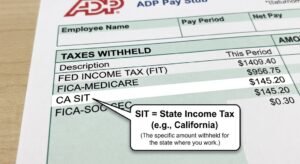
  • State Income Tax — varies by state (0%–13.3%)
  • Local / City Tax — applies in cities like NYC, Philadelphia, Detroit
  • State Disability Insurance (SDI) — required in CA, NJ, NY, RI, HI
  • State Unemployment (SUI) — some states deduct employee contributions
💡 Did You Know? Nine states have no state income tax: Alaska, Florida, Nevada, New Hampshire, South Dakota, Tennessee, Texas, Washington, and Wyoming.
5 Step Five

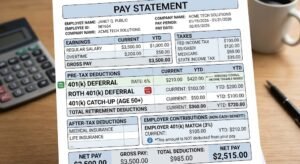
Pre-Tax Deductions

Pre-tax deductions are taken from your gross pay before taxes are calculated. This reduces your taxable income — meaning you pay less in taxes overall.

DeductionWhat It Is
401(k) / 403(b)Retirement savings. 2026 limit: $23,500/year ($31,000 if age 50+)
Health InsuranceMedical, dental, and vision premiums under your employer’s group plan
FSAFlexible Spending Account — pre-tax funds for medical or dependent care costs
HSAHealth Savings Account — only available with a High Deductible Health Plan
Commuter BenefitsPre-tax transit/parking benefits (up to $315/month in 2026)
Group Life InsuranceEmployer-provided life insurance premiums (up to $50,000 coverage is pre-tax)
Example

Gross $4,000 − $200 (401k) − $150 (health) = $3,650 taxable. You save taxes on every single paycheck.

6 Step Six

Post-Tax Deductions

Post-tax deductions come out after taxes are calculated. They don’t lower your taxable income, but they may provide other long-term benefits.

  • Roth 401(k) — taxed now, but qualified withdrawals in retirement are 100% tax-free
  • Life insurance premiums above the pre-tax coverage limit ($50,000)
  • Wage garnishments — court-ordered deductions (child support, student loan defaults)
  • Union dues — if you are a union member
  • Charitable contributions via payroll deduction
⚠️ Watch Out: Wage garnishments are legally required and cannot be stopped by your employer. If you see an unexpected garnishment, consult a financial advisor or attorney immediately.
7 Step Seven

Net Pay — Your Take-Home Pay

Net Pay is the amount actually deposited into your bank account (or printed on your check). Here’s how it’s calculated:

Gross Pay − Pre-Tax Deductions − All Taxes − Post-Tax Deductions
= Net Pay

On ADP stubs this is labeled “Net Pay”, “Net Check”, or “Amount Paid.”

If you have multiple bank accounts set up for direct deposit, ADP splits your net pay across them. Each deposit appears as a separate line with its own bank reference and amount.

💡 Rule of Thumb: Most people’s net pay is 65–80% of gross pay, depending on their tax bracket, state, and benefit elections.
8 Step Eight

YTD (Year-to-Date) Totals

On the right side of your ADP pay stub, every earnings and deduction item has a YTD column showing the running cumulative total from January 1 through your current pay date.

Why YTD Matters

  • Track total annual earnings for loan or mortgage applications
  • Verify Social Security tax stops after you hit the $174,900 wage base (2026)
  • Ensure 401(k) contributions don’t exceed the $23,500 IRS annual limit
  • Cross-check with your W-2 at year-end to confirm everything matches
  • Estimate your total federal and state tax liability before filing season
💡 Tax Planning Tip: If your YTD federal income tax looks low relative to earnings, you may owe money at filing time. Update your W-4 with HR to increase withholding now and avoid a year-end surprise.
9 Step Nine

PTO & Leave Balances

Many ADP pay stubs include a leave balance section at the bottom. This section varies significantly by employer — some companies don’t include it at all, or track leave in a separate HR portal.

  • PTO / Vacation Earned — hours accrued so far this year
  • PTO / Vacation Used — hours taken this pay period
  • Remaining Balance — hours you still have available to use
  • Sick Leave — often tracked separately by employers
💡 Note: If your PTO balance looks wrong, check the ADP self-service portal at my.adp.com for a more detailed breakdown, or confirm with your HR department.

ADP Pay Stub Abbreviations — Quick Reference

Here are the most common abbreviations you’ll see on an ADP pay stub:

FWT/FITFederal Withholding Tax / Federal Income Tax
SWT/SITState Withholding Tax / State Income Tax
OASDIOld Age, Survivors & Disability Insurance (Social Security)
MEDMedicare Tax — 1.45% of all wages
YTDYear-to-Date — cumulative total since Jan 1
GTLGroup Term Life Insurance
FSAFlexible Spending Account
HSAHealth Savings Account
401KEmployee retirement savings contribution
EEEmployee — your portion of contribution
EREmployer — your company’s matching portion
HRSHours worked during the pay period
REGRegular (standard) pay
OTOvertime pay — 1.5× regular rate
PTOPaid Time Off
SDIState Disability Insurance
SUIState Unemployment Insurance
DCFSADependent Care Flexible Spending Account
EICEarned Income Credit (advance payment)

Common Payroll Mistakes to Catch

Payroll errors are more common than most people realize. Always check your pay stub for these issues:

  • Wrong hours — regular and overtime hours should match your timekeeping records
  • Incorrect pay rate — especially after a raise; it may take a pay period or two to appear
  • Missing deductions — if you just enrolled in benefits, confirm they show up
  • Double deductions — the same deduction taken twice in one pay period
  • Wrong tax filing status — causes under- or over-withholding all year long
  • Social Security over-withheld — should stop after you exceed $174,900 in annual wages
⚠️ Found an Error? Report it to HR or payroll in writing as soon as possible. Most errors can be corrected within one or two pay cycles.

ADP Pay Stub FAQs

Why is my net pay different this paycheck?
Common reasons include: a change in hours worked, a bonus or commission payment, a benefit deduction starting or stopping, an update to your W-4 withholding, or a 401(k) contribution rate change. Compare the current stub against last period’s to identify the difference.
What is the difference between gross pay and net pay?
Gross pay is what you earned before any taxes or deductions. Net pay is what you actually receive after all withholdings are subtracted. Most people’s net pay is 65–80% of their gross pay, depending on their tax bracket, state, and benefit elections.
What does YTD mean on a pay stub?
YTD stands for Year-to-Date. It shows the cumulative total of each earnings or deduction item from January 1 of the current calendar year through your current pay date. It is especially useful for tracking annual earnings, retirement contributions, and total tax withholdings.
How do I access my ADP pay stub online?
Log in to ADP’s employee self-service portal at my.adp.com, or through your employer’s dedicated ADP app. Navigate to the “Pay” or “Payroll” section to view, download, or print your current and historical pay stubs.
Can I change how much federal tax is withheld from my paycheck?
Yes. Submit an updated W-4 form to your HR or payroll department. Claiming additional withholding or adjusting your filing status will change how much federal tax is taken out each paycheck, helping you avoid owing money when you file your annual return.
Why does my employer pay Social Security tax too?
Social Security (6.2%) and Medicare (1.45%) are split equally between employee and employer. You pay 6.2% and your employer matches it — contributing another 6.2% on your behalf. This employer portion never appears on your pay stub but directly funds your future Social Security benefits.

Calculate Your Exact Take-Home Pay

Now that you understand your pay stub, use our free ADP Salary Calculator to estimate your net pay, see exactly how deductions affect your paycheck, and plan your finances with confidence.

Try the Free Calculator →

© 2026 adpsalarycalculator.com — For informational purposes only. This content does not constitute tax or legal advice. Consult a qualified tax professional for guidance specific to your situation.

Related Post

saasa mangement

What is SaaS HR Management?

What is SaaS HR Management? Adp paycheck Salary calculator The shift toward SaaS (Software as a Service) HR management has transformed from a modern trend

Read More »