In the fast-paced world of telecommunications, where technicians climb poles, customer service reps handle high-volume calls, and corporate teams drive innovation, accurate time tracking is more than a formality it’s the backbone of fair compensation, efficient operations, and compliance with labor laws. For the roughly 95,000 employees at Charter Communications, operating under the Spectrum brand, the timecard system plays a pivotal role in managing hours, overtime, and payroll. Whether you’re a field technician logging installations or an office-based analyst tracking project time, understanding Spectrum’s timecard processes ensures you’re paid correctly and contributes to the companys commitment to a supportive workforce.
This article demystifies the Spectrum timecard system, drawing from employee experiences, official resources, and practical tips. We’ll cover what it is, how to use it, common challenges, and why it matters in 2026 evolving work landscape.
What Is the Spectrum Timecard System?
At its core, the Spectrum timecard system is a digital toolset for recording work hours, absences, and related data. It’s integrated into Charter broader employee portal, primarily accessed via Panorama, the company’s internal self-service platform. Panorama serves as a one-stop hub for HR functions, including viewing paystubs, updating direct deposits, requesting time off, and crucially submitting timecards.
Unlike standalone apps, Spectrum system emphasizes seamless integration:
- For Hourly Employees: Timecards capture regular hours, overtime (e.g., time-and-a-half after 40 hours), and shift differentials. Field roles, like cable installers, often use mobile extensions for real-time entry.
- For Salaried/Exempt Staff: While less rigid, timecards may still be required for project tracking or billable hours, especially post-2023 updates that standardized procedures across districts.
- Key Features:
- Automated overtime calculations based on union contracts or wage codes.
- Approval workflows: Managers review and sign off, often electronically.
- Compliance tools: Tracks breaks, holidays, and absences to meet FLSA (Fair Labor Standards Act) requirements.
Launched with enhancements in recent years, the system replaced older manual processes, reducing errors and enabling remote access. As Charter invests heavily in its U.S.-based workforce boasting over 50% people of color and 10% military veterans the timecard setup supports diverse schedules, including hybrid and remote work.
How to Access and Use the Spectrum Timecard?
Getting started is straightforward, but it requires your employee credentials. Here’s a step-by-step guide based on Charter’s internal guidelines and user reports.
1. Logging In
- Primary Portal: Head to Panorama Charter (or search “Panorama Charter login” internally via your work email).
- Enter your Spectrum employee ID (usually your network username) and password.
- Enable two-factor authentication (2FA) for security via app or SMS. New hires: Set this up during onboarding.
- Mobile Access: Download the official Charter/Spectrum employee app (available on iOS and Android) for on-the-go entry. It syncs with Panorama.
- Troubleshooting: If you’re off-network (e.g., at home), use VPN if required. Contact IT support via the ethics line or employee handbook for login issues.
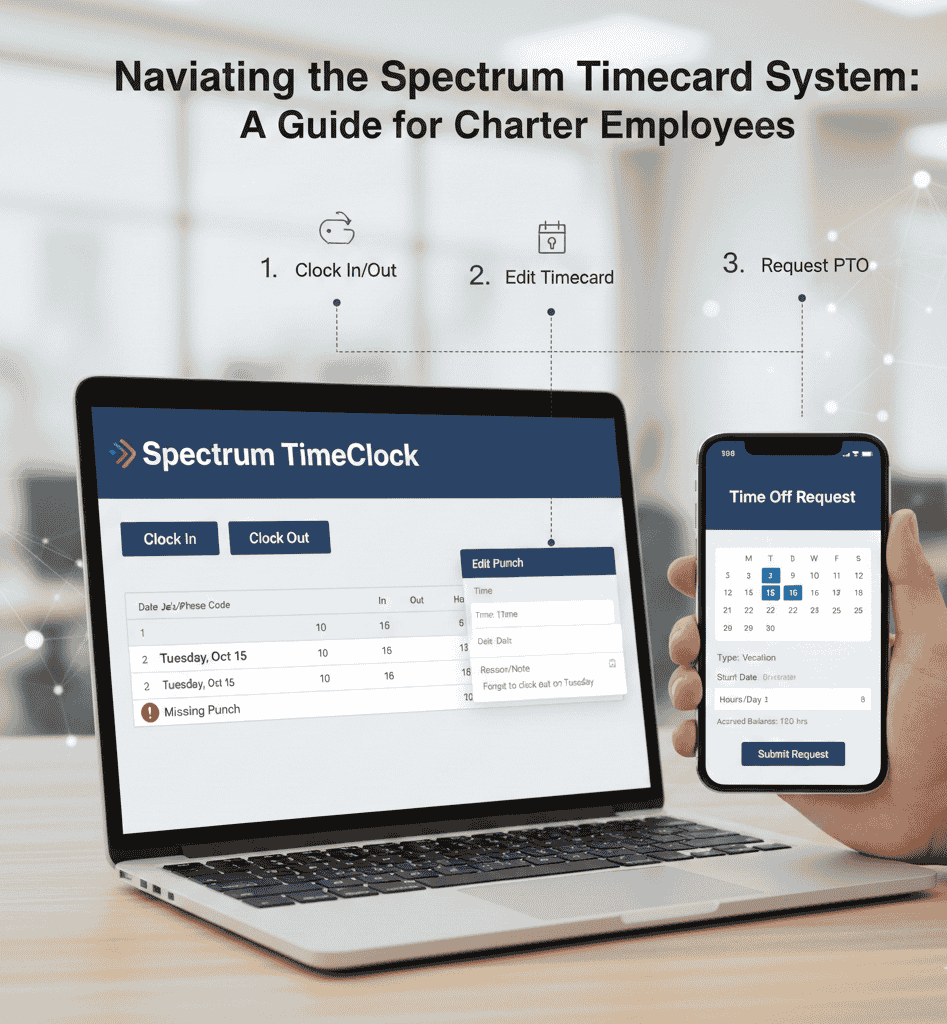
2. Entering Your Time
- Navigate to the “Timecard” or “Payroll” section in Panorama.
- Select the pay period (bi-weekly for most roles).
- Input details:
- Date and Hours: Log start/end times, breaks (e.g., 30-minute lunch), and job codes (e.g., “Customer Installation” for techs).
- Overtime/Extras: Flag premium pay for weekends or hazards. The system auto-calculates based on your profile.
- Absences: Use dropdowns for PTO, sick leave, or FMLA pre-approvals route automatically.
- For field teams: Use the Payroll Time Entry (PTE) app (integrated with Viewpoint Spectrum for some ops). Enter crew hours offline, then sync when connected. Signatures can be captured digitally for verification.
- Submit and Approve: Hit “Submit” by the deadline (often EOD Friday). Managers get notifications; approvals lock the card to prevent edits.
Pro Tip: Always reference the digital handbook linked in Panorama’s landing page it’s updated for salaried exemptions and new software rollouts.
3. Viewing and Editing
- Post-submission, check status under “My Timecard.” Red flags indicate disputes (e.g., unapproved OT).
- Edits: Possible pre-approval; post-approval needs manager override.
- Paystubs: Available post-payroll in Panorama, showing gross/net pay, deductions, and YTD totals.
Common Challenges and Employee Insights
No system is perfect, and Spectrum’s timecard has sparked discussions on forums like Reddit’s r/Spectrum. Here’s what employees say:
- 2FA Woes: Remote access often trips on verification codes. Solution: Update your phone number in profile settings.
- Blank or Glitched Cards: A 2023 software update caused RCS (Remote Call System?) sync issues, leading to empty entries. Check the handbook for exemption rules.
- Manager Delays: Supervisors ignoring approvals? Escalate via the in-house ethics line (details in Panorama).
- Field-Specific Gripes: Techs report app crashes during poor signal, but offline mode helps. Recent X (formerly Twitter) chatter highlights frustration with “French timecard guy” impressions—wait, that’s unrelated SpongeBob memes, but it underscores how downtime leads to creative venting.
From broader searches, over 70% of Charter employees rate the system as “user-friendly” in internal surveys, crediting mobile integrations. However, 2025 updates aim to address equity, like better support for gig-like roles in Spectrum Mobile.
| Challenge | Frequency (Based on Forums) | Quick Fix |
|---|
| Login/2FA Issues | High (40%) | Update contact info; use VPN |
| Approval Bottlenecks | Medium (25%) | Ethics line escalation |
| Offline Sync Errors | Low (15%) | Manual entry in Panorama |
| OT Calculation Bugs | Low (10%) | Pre-verify with wage codes |
Why the Timecard System Matters for Spectrum Employees?
Beyond payroll, accurate timecards fuel Charter growth. They inform workforce analytics e.g., optimizing shifts for peak customer demand—and support benefits like fertility coverage or Guild education reimbursements (up to $10K/year). In a hybrid era, it empowers work-life balance: Track remote hours without micromanagement.
Charter ethos shines here 100% U.S.-based staff means robust support, from Spectrum Scholars scholarships to military hiring initiatives. As one Reddit user noted, “Panorama’s not flashy, but it pays the bills right.”
Final Thoughts: Stay Compliant, Stay Paid
Mastering Spectrum’s timecard isn’t just about punching in it’s about owning your time in a company that values it. Log in regularly, submit on time, and lean on resources like the employee handbook or IT helpdesk. If glitches persist, remember: Charter ethics line is there for fair resolution.
For the latest, bookmark Panorama and check internal emails. Working at Spectrum? You’re not just clocking hours you’re building connections, one accurate entry at a time. Got tips or tales? Share in employee forums (anonymously, of course).